




-
Industries
Healthcare & Compliance
Patient data systems, compliance reporting, and workflow automation for regulated environments.
- HIPAA-aware integration pipelines
- Automated compliance dashboards
- Patient workflow digitization
Logistics & Supply Chain
Real-time tracking, route optimization, and inventory visibility across your distribution network.
- ERP/WMS integration
- Automated dispatch workflows
- Supply chain dashboards
SaaS & Tech-enabled
Scale your product infrastructure, integrate third-party tools, and ship features faster with reliable ops.
- API-first architecture
- Multi-tenant infrastructure
- CI/CD and release pipelines
Banking & Financial
Secure transaction processing, regulatory reporting, and customer-facing portals for financial services.
- Regulatory reporting automation
- Secure data integration
- Customer portal modernization
- Case Studies
Featured Case Studies
Browse all case studies →Euro Truck ServiceLogistics firm automated 12 manual workflows in a single 30-day sprint
"Read case study →Ergonnex AI 360Ergonnex AI 360 is a powerful project management platform that helps IT companies manage their projects better with built-in AI-powered analytics
Read case study →PanoramikPanoramic caters to your passion for sharing photos in a social media environment.
Read case study →

React hooks have revolutionized how developers manage state and lifecycle methods in React.js applications. Introduced in React 16.8, hooks allow developers to use functional components while leveraging powerful features like state management, side effects, and context. In this blog, we’ll explore the best practices, benefits, and practical examples of using React hooks to simplify your codebase.
What Are React Hooks?
React hooks are functions that let you “hook into” React state and lifecycle features in functional components. They enable developers to build applications more cleanly and concisely by reducing the need for class components.
Commonly Used Hooks:
- useState: Manages state in a functional component.
- useEffect: Handles side effects such as data fetching and subscriptions.
- useContext: Accesses context values without needing a higher-order component.
- useReducer: Manages complex state logic.
- useMemo: Optimizes performance by memoizing expensive calculations.
- useCallback: Memoizes functions to prevent unnecessary re-renders.
- useRef: Provides a mutable reference to DOM elements or persistent values.
Benefits of Using Hooks in React.js Applications
- Cleaner Code: Hooks remove the need for class components, making your codebase simpler and easier to read.
- Reusability: Custom hooks enable you to reuse logic across different components.
- Improved Performance: With hooks like useMemo and useCallback, you can optimize rendering and reduce computational overhead.
- Better State Management: Hooks like useReducer provide more control over complex state logic.
- Enhanced Testing: Functional components with hooks are easier to test compared to class components.
Best Practices for Using React Hooks
1. Follow the Rules of Hooks
- Call hooks at the top level: Never use hooks inside loops, conditions, or nested functions. This ensures React can maintain the correct state.
- Only call hooks in React functions: Hooks should only be used inside functional components or custom hooks.
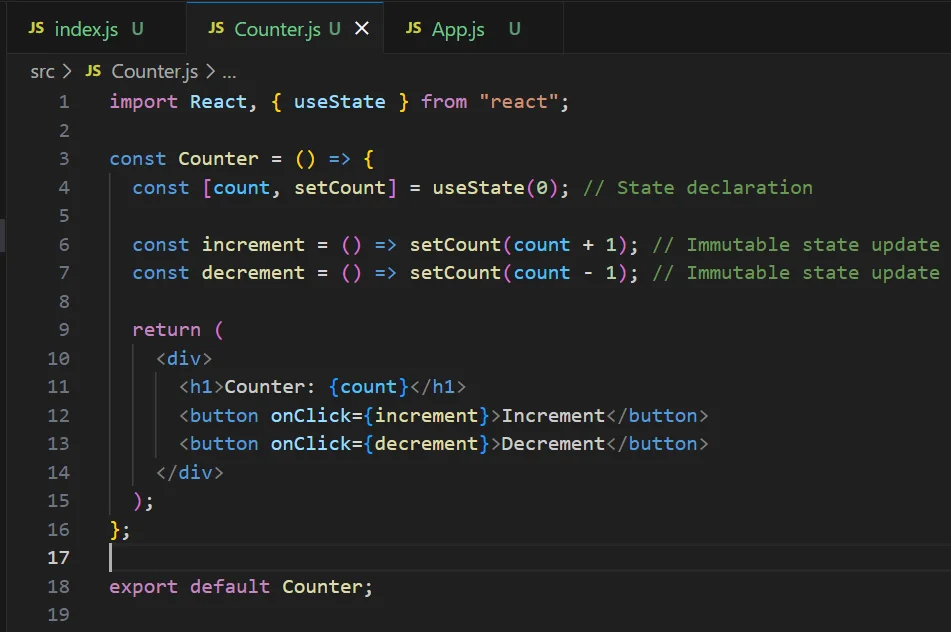
2. Use Custom Hooks for Reusability
- Encapsulate reusable logic into custom hooks to keep your components clean.
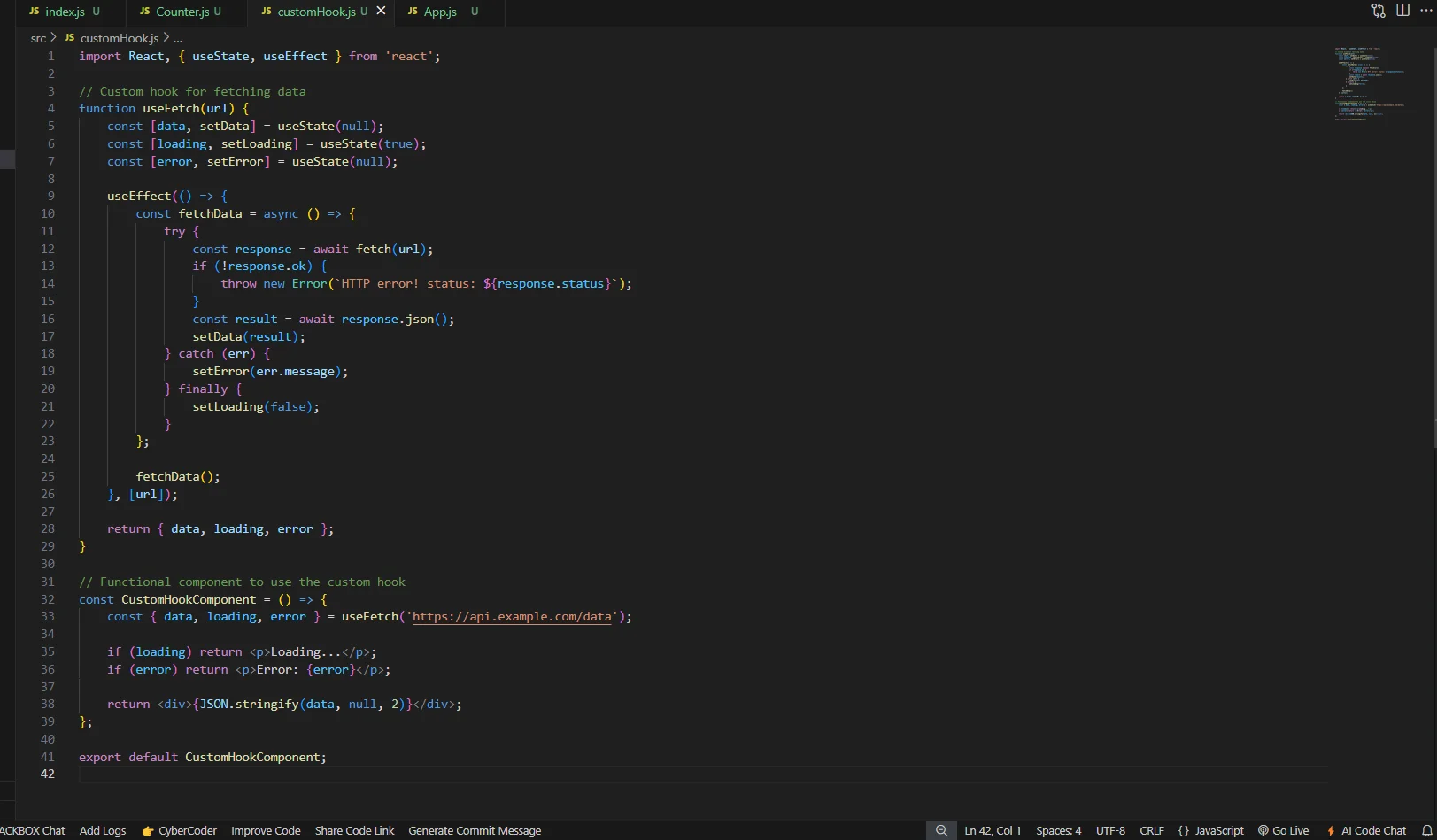
3. Manage Side Effects Effectively with useEffect
The useEffect hook is powerful for managing side effects like API calls, subscriptions, and DOM updates. Follow these tips for optimal use:
- Specify Dependencies: Always provide a dependency array to avoid infinite loops.
- Clean Up Effects: Return a cleanup function to avoid memory leaks.
Exmaple:
useEffect(() => {
const interval = setInterval(() => {
console.log(‘Running side effect’);
}, 1000);
// Cleanup function
return () => clearInterval(interval);
}, []); // Dependency array
4. Optimize Performance with useMemo and useCallback
These hooks prevent unnecessary re-computations and re-renders.
- useMemo: Memoizes expensive calculations.
const expensiveCalculation = useMemo(() => {
return computeHeavyTask(input);
}, [input]);
- useCallback: Memoizes callback functions.
const handleClick = useCallback(() => {
console.log(‘Button clicked’);
}, []);
5. Avoid Overuse of State
While useState is powerful, overusing it can lead to cluttered components. Use useReducer for managing complex state.


Practical Examples of Using Hooks in React.js
Example 1: Managing Form State with useState

Example 2: Fetching Data with use Effect
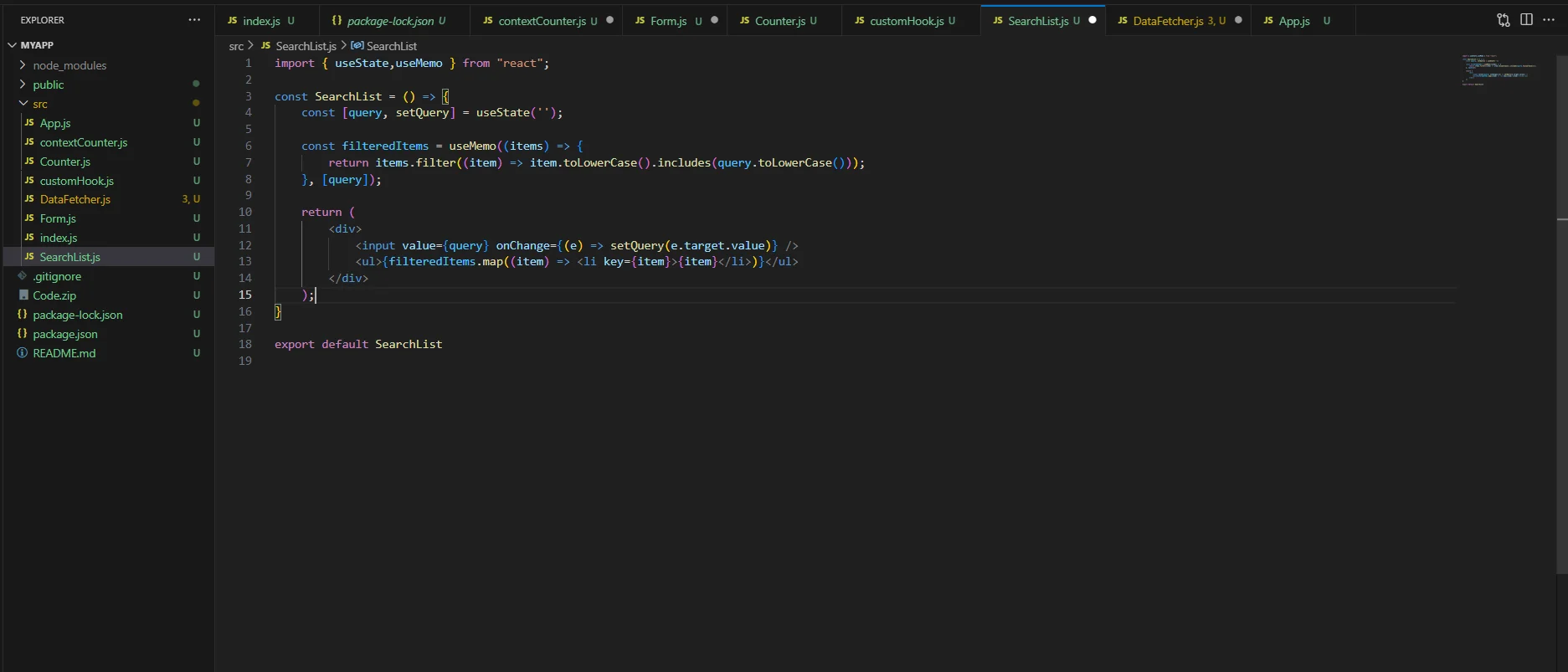
Example 3: Creating a Search Filter with useMemo

Troubleshooting Common Issues with Hooks
1.Infinite Loops in useEffect: Ensure dependencies are correctly specified in the dependency array.
2.State Updates Not Reflecting Immediately: Remember that useState updates are asynchronous.
3.Memory Leaks: Always clean up subscriptions and event listeners in useEffect.



Blazor vs React for Enterprise Apps: When Each One Wins Rohit Dabra | April 28, 2026 Table of Contents Facebook-f Twitter Linkedin Blazor vs React is one of the most actively debated front-end decisions on .NET projects right now, and if you’re planning an enterprise
When discussions turn to hybrid and native app performance, Ionic is often the framework that gets questioned. Among cross-platform options such as React Native, Flutter, and Xamarin, the Ionic UI framework is known for helping teams get a mobile app to market faster. However, this speed is often viewed as a compromise on performance.

While companies invest in flutter app development for interactive user interfaces, an app’s performance often becomes the deciding factor in whether users stay or leave. Users may not consciously notice a well‑designed interface, but they immediately feel when an app becomes laggy, slow, or unresponsive.





Sahil Kataria
Founder and CEO

Amit Kumar
Chief Sales Officer



QServices Inc. undertakes every project with a high degree of professionalism. Their communication style is unmatched and they are always available to resolve issues or just discuss the project.
